Your site's speed, and everything behind it.
Permo puts it all in one place in WordPress: Google's PageSpeed test with real-visitor data, its own measurement from your server, and your whole setup, from PHP to plugins and database. Find what slows your site down, and see when it changes.
A score is easy to get. Knowing what to do with it is harder.
PageSpeed Insights, GTmetrix and others test your site for free. You get a score and a page full of numbers. Then the questions start:
- What does this value mean, and is it bad?
- Is it my site or my server?
- Was it better last month?
- What changed?
What Permo does
Permo runs inside WordPress and answers these questions where you already work.
See all featuresMeasure
What does Permo check, and how often?
Google's PageSpeed test with data from real visitors, Permo's own measurement from your server, and your whole setup: 63 values, on a schedule you set.
Google's test needs a free key; everything else works without one.
How Permo measures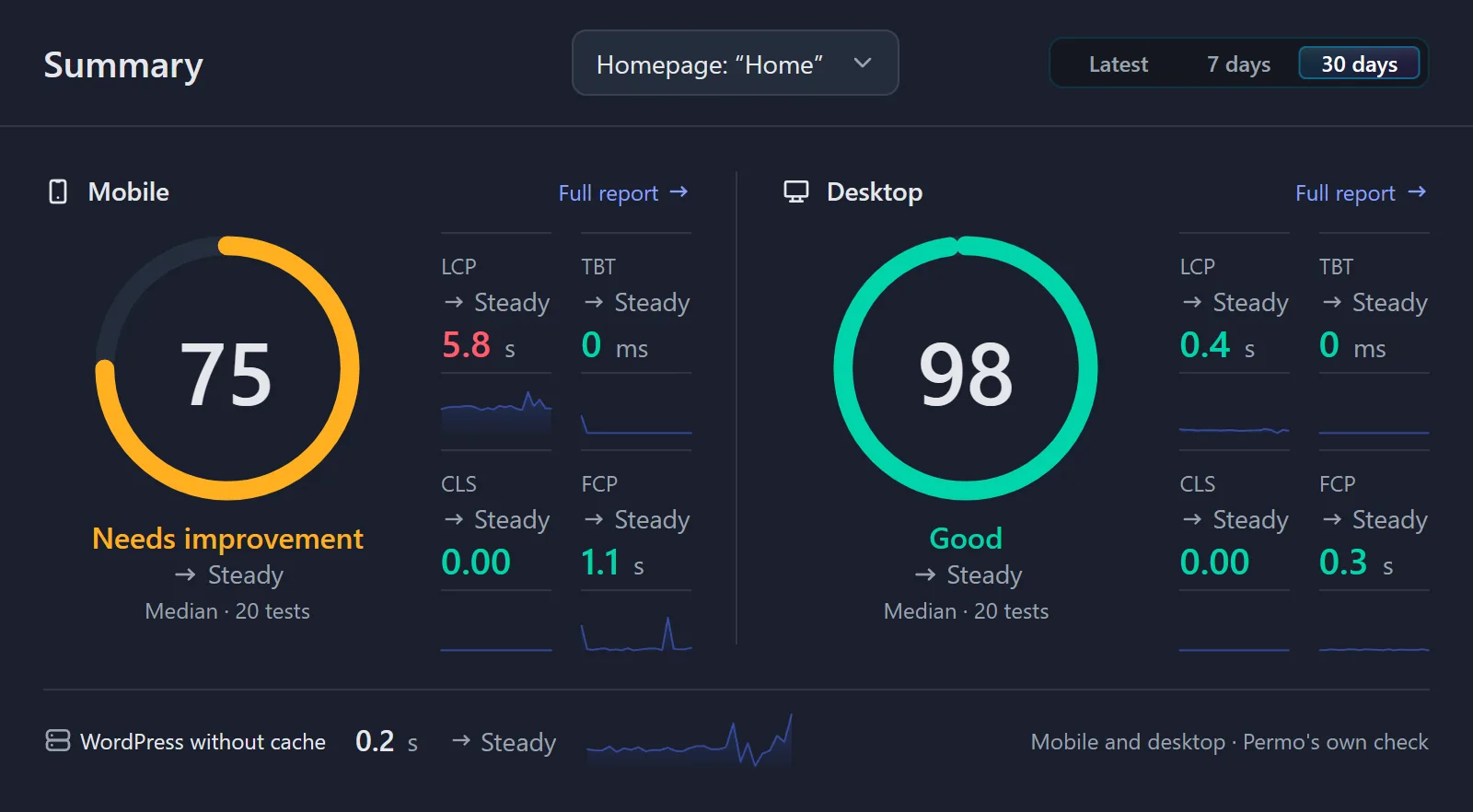
Understand
What does this number mean? Is it bad?
Every value comes with a short explanation right where you see it, and its own page in the docs. Ratings show what's fine and what isn't.
How Permo explains values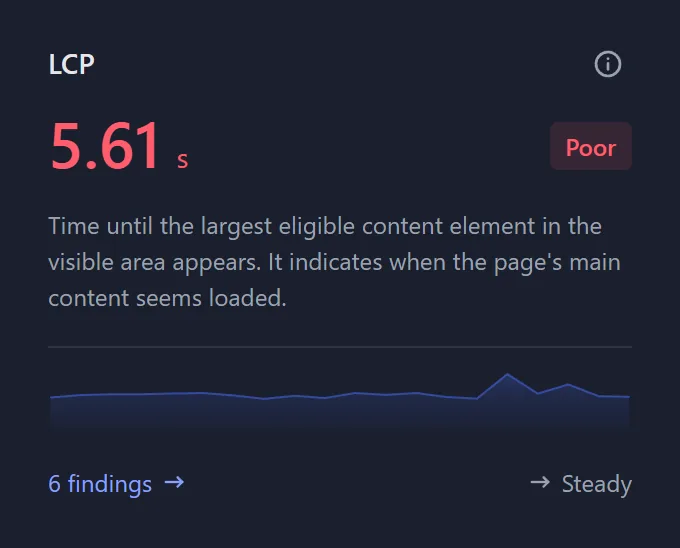
Analyze
What's causing it? My site or my server?
See whether a slow page comes from your site or your server, what's running on it, and where to start.
How Permo analyzes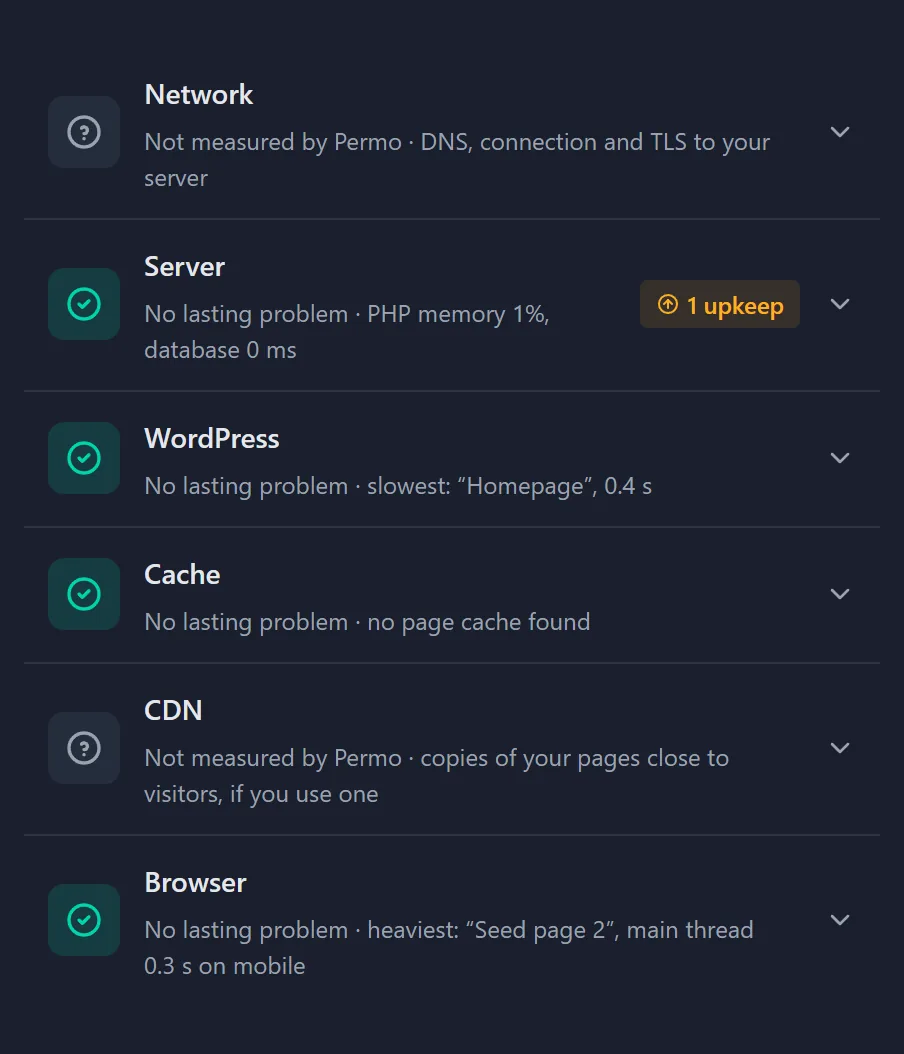
Monitor
Is it getting better or worse? What changed?
Every check is kept, next to what changed on your site. When a page got slower, you see when, and what happened that week.
How Permo monitors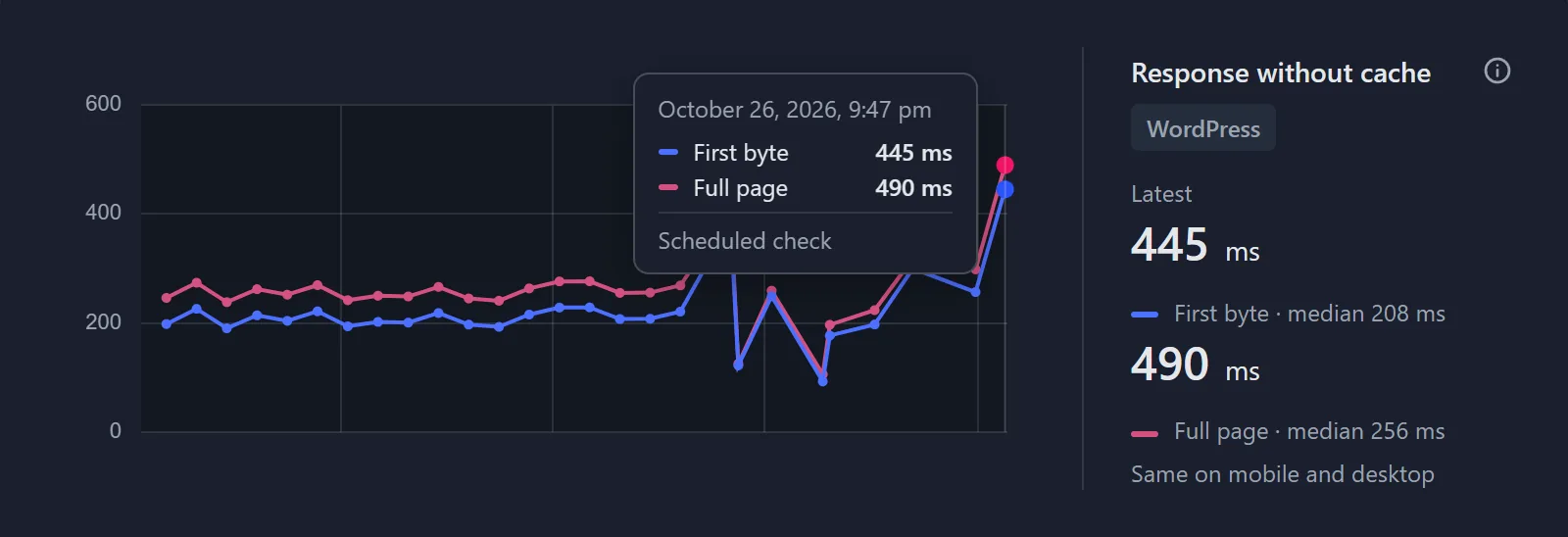

Permo measures. It doesn't optimize.
Keep the speed plugins you use. Permo shows whether they work.
Permo doesn't cache your pages, shrink your files or rewrite your code. It measures, explains and analyzes.
What you get is where to start: whether the time goes to the server, WordPress, a plugin or the page itself, and for each value, what influences it. Then you know what to change, or what to ask your hosting provider.
And it runs next to the plugins that do optimize. When you switch on a cache or add a plugin, the history shows whether your pages got faster. Permo also lists the caching and optimization plugins it finds on your site.
Light on your site, measured
Another plugin that slows your site down is the last thing you need. So we measured what Permo costs, on the same pages with and without it.
Permo 0.8.4 on a test site, measured on October 27, 2026.
- No difference for your visitors
- 0.0 ms difference in server time, median across six pages
- No extra database queries
- 0 queries from Permo on the pages your visitors see
- Nothing loaded in the browser
- 0 scripts and 0 stylesheets from Permo on those pages
- Nothing sent out when you open Permo
- 0 outside requests on all 12 of Permo's screens and tabs
- Checks go unnoticed
- 69 ms median server time for visitors during a check of all pages, 71 ms before
Who Permo is for, and when
You look after your own site
Your own site, or your company's. You want to know whether it's fast, and what to do when it isn't, without becoming an expert. Every value in Permo tells you what it means.
You look after many sites
Client sites, often with a maintenance plan. On each site, Permo keeps every check, notes every update, and sums up each month in a report by email, which helps with your own reports to clients.
01When you want a faster site
Find out why a page is slow and where the bottleneck is: the server, WordPress, a plugin or the page itself. Make a change with your own tools, check again, and see whether it helped.
02When you want to keep it fast
Your site is where you want it. Permo checks it on its own, keeps every check, and shows you when it gets slower, or faster, and what changed that week.
Free, and what comes next
Permo is free:
- Every feature
- No account with us
- No ads or upsells in your dashboard
And there's more to come. Here are some of the ideas we're looking at:
- Permo and AI Ask your AI assistant why your site got slower, and get the answer from Permo's checks.
- Alerts Hear right away when a page turns Poor or the server struggles.
- Recommendations Not only what slows your site down, but what to do about it.
Questions
Is Permo free? Do I need an account?
Permo is free, and you don't need an account with us. For Google's PageSpeed test, you add a free API key from Google.
Does Permo slow my site down?
No. On the pages your visitors see, Permo loads no scripts or styles and makes no database queries. In our test, the difference was 0.0 ms.
Does Permo optimize my site?
No. Permo doesn't cache pages, shrink files or rewrite code. It shows where the time goes and what influences it, and whether the plugins that do optimize actually work.
How is Permo different from PageSpeed Insights or GTmetrix?
They test a page once, from the outside. Permo also measures from inside your own server, keeps every check, and notes what changed on your site. It runs Google's PageSpeed test for you, too.
Do I need a Google API key?
Only for Google's PageSpeed test. Permo's own measurement and the server values work without one. The key is free, and Permo sends Google only the address of the page to test.
Does Permo work with my page builder?
Yes. Permo measures the finished page, however it's built: with a page builder, the block editor or your theme. When the page builder is updated, Permo notes that too.
My site has more than ten pages. Is that enough?
Yes, in most cases. Pages built the same way load about the same, so choose your homepage and one page of each kind, such as a post, a product and the contact page. The server values cover the whole site anyway.
What if the problem is my server?
Then you know what to ask your hosting provider. Permo shows the values that point to the server, such as how busy it is, how much memory PHP uses and how fast the database answers, each with an explanation you can pass on.
Does Permo work on shared hosting?
Yes. It needs WordPress 6.9 or later, PHP 8.1 or later, and the PHP extension cURL, which almost every hosting provider has. On shared hosting, some server values, such as the load, show the whole machine; the docs explain each one.
Does Permo check my pages if my site has few visitors?
Yes, but checks may start late. WordPress runs its scheduled tasks when someone visits, so on a quiet site a check can start later than planned. Permo shows how late, and your hosting provider can fix it by calling WP-Cron every 15 minutes.
What's left when I delete Permo?
Nothing, unless you choose to keep it. Deleting Permo removes its checks, settings and API key, along with its scheduled tasks. One setting keeps the data for a later reinstall.
Will there be ads or upsells in my dashboard?
No. Permo shows no ads and no upsells. Apart from a notice if your PHP version is too old, it shows nothing outside its own screens.
Try Permo
Click through every screen in the demo, or read what each part of Permo does.
Permo needs WordPress 6.9 or later and PHP 8.1 or later; you'll find both under Tools → Site Health → Info. It doesn't run on a multisite network.